Migrating from WooCommerce to Shopify Without Losing Google Rankings or Traffic
A comprehensive, zero-downtime SEO migration checklist from WooCommerce to Shopify — 301 redirect mapping, URL translation, metadata preservation, and tracking validation.
- Written by
 Fahad, Founder — Head of Development
- Published
- Reading time
- 1 min
- Audit Standard
- Real CrUX Data
On this page · 2 sections
Moving from WooCommerce to Shopify is one of the most effective ways to escape server crashes, plugin vulnerabilities, and slow checkout flows. However, the #1 fear merchants face during migration is losing organic search traffic and revenue built over years on WordPress.
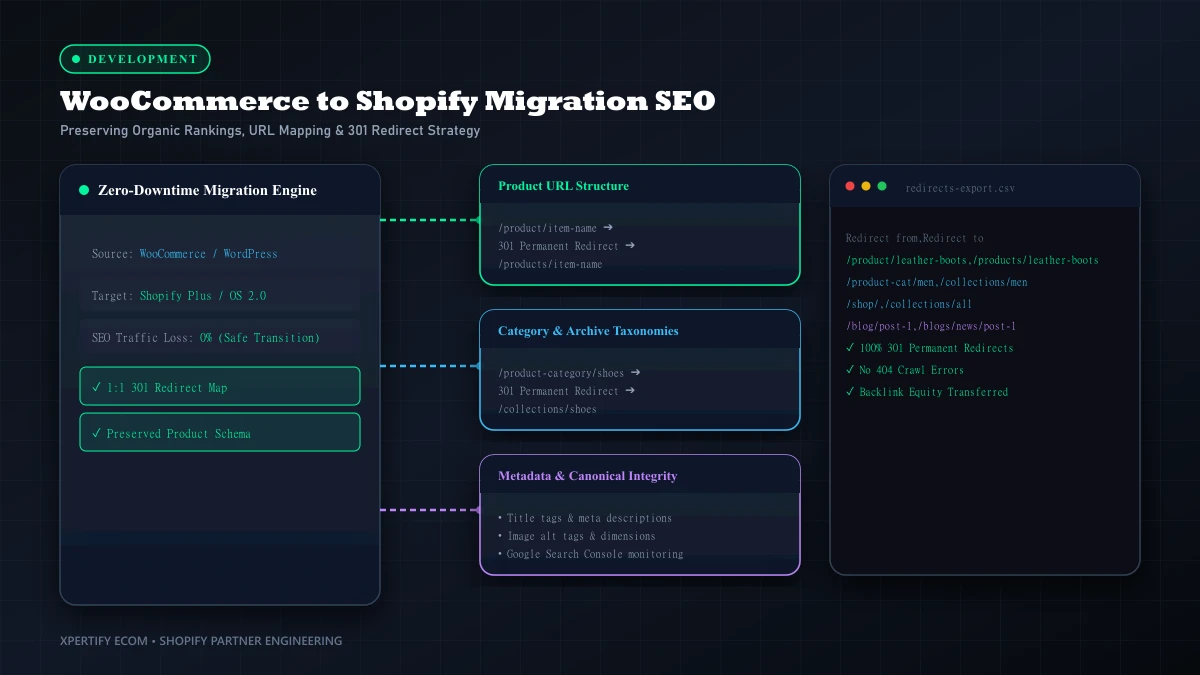
Shopify uses a rigid URL structure (`/products/product-name` and `/collections/collection-name`) that differs from WooCommerce's configurable taxonomies. Without meticulous 301 redirect architecture and metadata preservation, a re-platform can cause search rankings to plummet overnight.
The Zero-Loss SEO Migration Checklist
| Phase | Critical Task | Common Risk If Missed |
|---|---|---|
| Pre-Launch | Crawl all WooCommerce URLs with Screaming Frog | Orphaned URLs causing 404 errors |
| Pre-Launch | Export historical orders, customers & reviews | Lost customer history & social proof |
| Configuration | Map 1:1 301 redirects for every single URL | Catastrophic loss of Google ranking equity |
| Theme Build | Match H1, H2 structure and category intro copy | Loss of keyword relevance on main collections |
| Launch Day | Update DNS records (TTL lowered 48h prior) | Extended downtime during nameserver propagation |
| Post-Launch | Submit updated sitemap.xml to Google Search Console | Delayed indexing of new URL structures |
Translating WooCommerce URLs to Shopify
- Product URLs: Map `/product/leather-jacket/` → `/products/leather-jacket` via Shopify URL Redirects CSV export/import.
- Category URLs: Map `/product-category/outerwear/` → `/collections/outerwear`.
- Blog URLs: Map `/blog/styling-guide/` or `/2025/styling-guide/` → `/blogs/news/styling-guide`.
- Canonical Tag Verification: Verify that every new page outputs self-referencing canonical tags to prevent duplicate content flags.

Planning a migration from WooCommerce or Magento to Shopify? Our senior developers guarantee zero downtime, clean data transfer, and 100% SEO ranking preservation.
Plan Your Store Migration