The Clean Theme Architecture: Auditing Ghost Code, Liquid Bloat & App Extension Migrations
A developer's guide to removing orphaned app snippets, sanitizing theme.liquid, and migrating to modern Shopify Theme App Extensions for peak performance.
- Written by
 Khizer, Lead Liquid Architect
- Published
- Reading time
- 2 min
- Audit Standard
- Real CrUX Data
On this page · 2 sections
Every growing Shopify brand suffers from the same silent technical problem: storefront code rot. Over two years of operation, a merchant typically tests 25 to 40 different apps for countdown timers, spin-to-win popups, review stars, currency switchers, and push notifications.
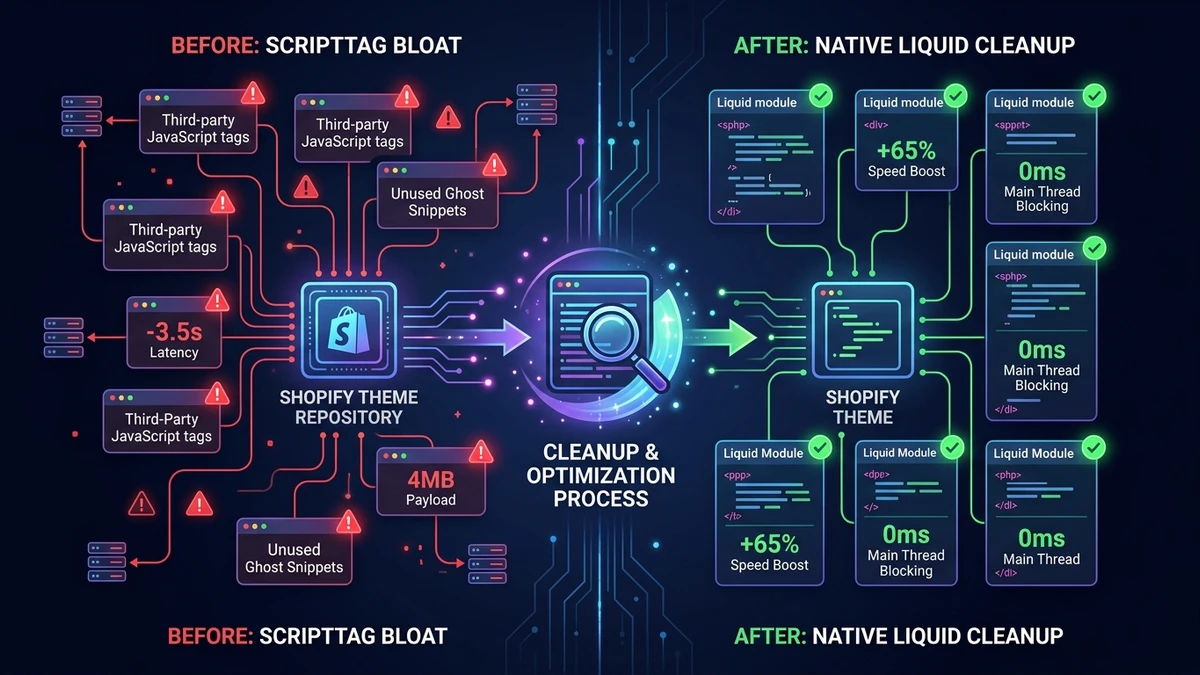
When an app is clicked 'Delete' in the Shopify admin, its dashboard permissions are revoked. But in 90% of legacy themes, the app's injected tracking scripts, CSS stylesheets, and Liquid snippets remain permanently lodged inside your codebase. This 'ghost code' continues executing on every visitor session, downloading assets from dead servers and tanking mobile performance.
Legacy ScriptTags vs Modern Theme App Extensions
Prior to Shopify Online Store 2.0, apps injected code directly into `theme.liquid` using the legacy `ScriptTag` API. This meant apps had uncontrolled access to your store's main thread and could inject scripts anywhere on the page without isolation.
| Technical Metric | Legacy ScriptTag Injection | Modern Theme App Extension (OS 2.0) |
|---|---|---|
| Insertion Method | Injected directly into theme files or database | Managed cleanly via Shopify's App Block / Embed infrastructure |
| Uninstallation Behavior | Leaves orphaned Liquid snippets and dead CSS files | Instantly and completely removed the moment app is disabled |
| Loading Control | Loads globally on every page whether needed or not | Conditional activation only on pages where the block is added |
| Theme Editor UX | Requires editing code files to move or hide elements | Native drag-and-drop repositioning in Shopify Theme Customizer |
| Mobile INP Impact | High risk of main-thread locking during user taps | Sandboxed execution with minimal thread interruption |
How to Audit and Purge Orphaned Code
When auditing stores through our custom Shopify development services, we follow a rigorous 4-step cleanup protocol:
- 01Theme File Inspection: Audit `layout/theme.liquid` for forgotten CDN `<script src="...">` references and obsolete tracking pixels.
- 02Snippets Directory Sanitization: Search the `snippets/` folder for prefixes belonging to uninstalled vendors (e.g., `globo.`, `judgeme.`, `loox.`, `klaviyo.`). Remove unreferenced files.
- 03Asset Storage Cleanup: Delete obsolete `.scss.liquid` files, legacy jQuery libraries, and third-party icon fonts that have been replaced by native SVGs.
- 04Section Decoupling: Refactor hardcoded page layouts into modular Liquid sections with full schema customization.
Suspect your theme is carrying years of uninstalled app bloat? Our senior Liquid developers audit, sanitize, and refactor your store code for optimal speed and reliability.
Book a Technical Code Audit