Shopify Checkout Extensibility: What It Is and What to Do Now
What Shopify Checkout Extensibility is, which deadlines have passed, and how to replace checkout.liquid, additional scripts and Shopify Scripts.
- Written by
 Fahad, Founder & Head of Development
- Published
- Updated
- Reading time
- 3 min
- Audit Standard
- Real CrUX Data
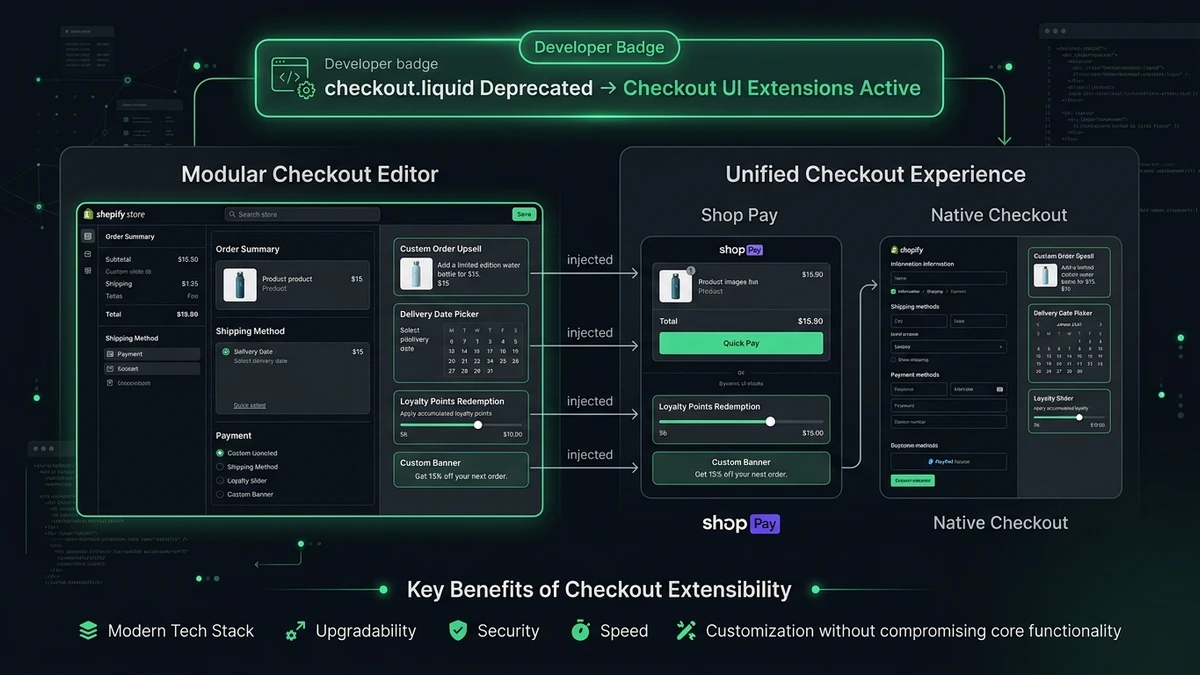
Shopify Checkout Extensibility is Shopify's current way to customize checkout, using apps, the checkout editor, Shopify Functions and web pixels instead of editing `checkout.liquid`. The old methods have now been switched off. `checkout.liquid`, additional scripts and Shopify Scripts have all passed their shutdown dates, so any store still relying on them should check what has stopped working.
Which deadlines have passed?
| Date | What changed | Who it affects |
|---|---|---|
| 13 August 2024 | `checkout.liquid` stopped working on the information, shipping and payment pages | Plus stores |
| 28 August 2025 | `checkout.liquid`, additional scripts and script tags ended on the Thank you and Order status pages | Plus stores |
| 15 April 2026 | Shopify Scripts could no longer be edited or published | Plus stores using Scripts |
| 30 June 2026 | All Shopify Scripts stopped running | Plus stores using Scripts |
| 26 August 2026 | Script tags ended on the Thank you and Order status pages | Stores not on Plus |
Sources: Shopify's checkout.liquid changelog, Scripts changelog and order status script tag docs. Shopify's Help Center also says automatic upgrades for stores not on Plus began in January 2026, so check your own admin for the status of your store.
What replaces the old methods?
| What you used to do | What to use now |
|---|---|
| Add fields or banners in `checkout.liquid` | Checkout UI extensions, through an app |
| Change colors and fonts with custom CSS | The checkout editor or the branding API |
| Run discount logic in Shopify Scripts | Shopify Functions discount APIs |
| Hide or rename payment and delivery options | Shopify Functions customization APIs |
| Paste tracking into additional scripts | Web pixels, through customer events |
| Show content on the Thank you page | Extensions for the Thank you and Order status pages |
What are the four main parts?
- 01Checkout UI extensions add custom content in set places, such as a gift note or a delivery date picker.
- 02Shopify Functions run your custom logic on Shopify's servers, for discounts, shipping and payment rules.
- 03Web pixels run tracking in a sandbox, so tags can't touch the checkout page directly.
- 04Branding tools control fonts, colors and layout so the checkout matches your store.
What's available on my plan?
- Customizing the information, shipping and payment steps: this is a Shopify Plus feature.
- Thank you and Order status pages: merchants on Basic, Shopify and Advanced plans can also customize these, as Shopify's changelog explains.
- Functions: stores on any plan can use public App Store apps that contain Functions. Only Plus stores can use custom apps with Function APIs, according to Shopify's migration docs.
How do I move to Checkout Extensibility?
- 01List what you had. Include checkout code, additional scripts, Scripts and apps. Shopify's Scripts transition guide points to a customizations report that shows what was active.
- 02Sort each item. Keep it, replace it with an app, build it with an extension or Function, or drop it. Many old tweaks are no longer needed.
- 03Do tracking first. Rebuild GA4, Meta and affiliate tracking as web pixels, because bad tracking damages your ads.
- 04Check apps. Ask each checkout app whether it supports extensions.
- 05Test the full journey. Try real discounts, shipping options and payment methods, on mobile and with Shop Pay.
- 06Watch the first week. Compare orders, conversion rate and tracked purchases with the week before.
What are common mistakes?
- Assuming nothing changed. A discount or free gift rule that used Scripts may have stopped on 30 June 2026.
- Tracking purchases twice. If an old tag and a new pixel both fire, your ad results will look better than they are.
- Rebuilding everything. Each customization is more to maintain, and many don't help sales. Keep what earns its place.
- Skipping mobile tests. Most shoppers will use your checkout on a phone.
If your checkout works, the next step is making it convert. Read our guides to checkout optimization and one-page checkout.
Need a checkout customization rebuilt, or not sure what stopped working? Send us the details for a fixed quote.
See custom coding