Shopify Font Optimization: System Fonts vs WOFF2 vs Google Fonts
How web fonts impact Largest Contentful Paint (LCP) and Cumulative Layout Shift (CLS) on Shopify, and the exact steps to load typography with zero layout shift.
- Written by
 Zayn, Developer & Performance Expert
- Published
- Reading time
- 2 min
- Audit Standard
- Real CrUX Data
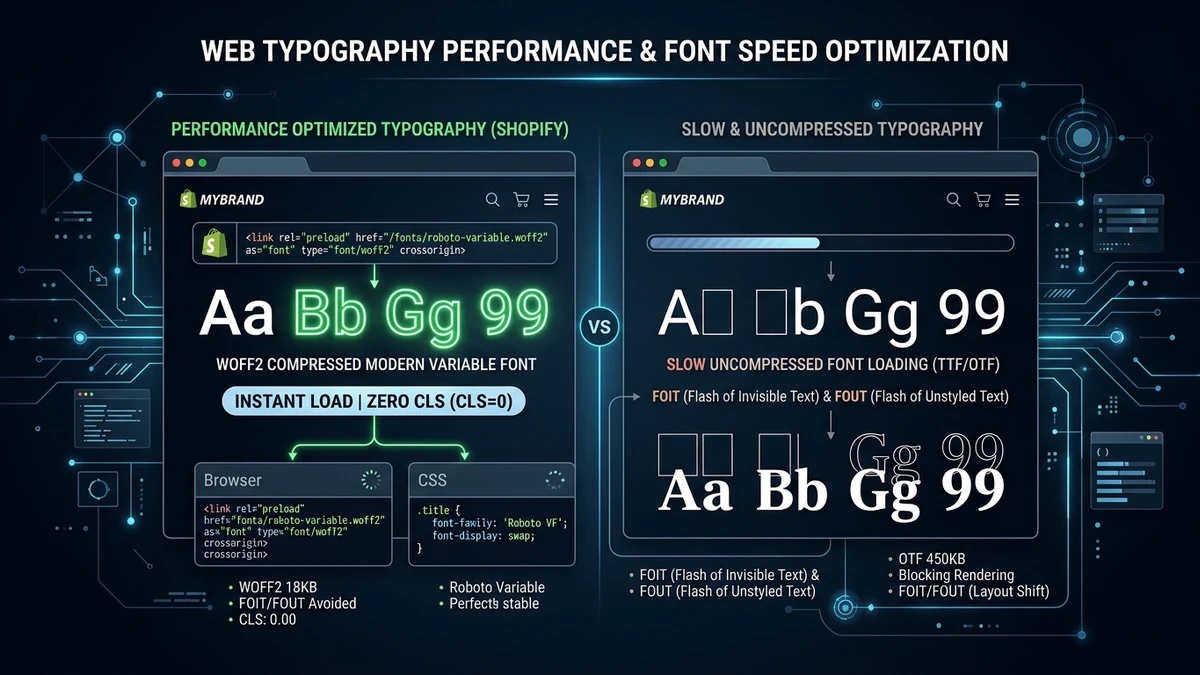
Typography shapes your brand identity, but improper font loading is one of the most common causes of high Cumulative Layout Shift (CLS) and delayed Largest Contentful Paint (LCP) on Shopify stores. Every custom font requires HTTP handshakes, stylesheet parsing, and binary file downloads before text can render.
If you want both luxury typography and sub-second load times, you must understand the trade-offs between system font stacks, self-hosted WOFF2 files, and third-party hosted services like Google Fonts or Adobe Typekit.
Comparing Typography Strategies on Shopify
| Font Strategy | Load Impact | Flashes (FOIT/FOUT) | Brand Flexibility |
|---|---|---|---|
| System Fonts (Inter/San Francisco) | 0 ms (Instant) | None — 0 layout shift | Limited to native device fonts |
| Self-Hosted Preloaded WOFF2 | 50 – 120 ms | Zero shift with size-adjust | Complete creative control |
| Google Fonts CDN (@import) | 250 – 600 ms | Severe flash & blocking | Broad library, high latency |
| Adobe Typekit External JS | 400 – 900 ms | Significant render delay | High agency tier, slowest speed |
Why Google Fonts CDN Hurts Shopify Performance
Many theme developers include `<link href="https://fonts.googleapis.com...">` in `theme.liquid`. While convenient, this requires two separate external origins (`fonts.googleapis.com` for CSS and `fonts.gstatic.com` for the WOFF2 files). The browser cannot begin drawing text until both connections resolve their DNS, TLS, and TCP handshakes.
Eliminating Layout Shifts with CSS size-adjust
When a custom font loads after the fallback font, words often wrap to new lines, jarring the layout and inflating your CLS score. Use modern CSS font metrics override descriptors to match the fallback font's bounding box exactly:
- `font-display: swap`: Ensures text is visible immediately using the fallback font rather than remaining invisible (FOIT).
- `ascent-override` & `descent-override`: Matches the vertical ascender and descender heights of the system font to your custom font.
- `size-adjust`: Scales the fallback glyphs up or down so letters occupy the exact same horizontal space, eliminating line-wrapping jumps.
Applying these rules in your theme styles ensures that when your brand font arrives, it snaps in place without shifting a single pixel of product descriptions or checkout copy.
Want fast, elegant typography without hurting your Core Web Vitals? Our Shopify developers eliminate font shifts and optimize asset delivery.
Speed Up Your Typography