Meta Ads for Shopify: A Beginner's Guide That Actually Converts
How to run Facebook and Instagram ads for a Shopify store the right way — tracking, creative, testing and budget — without burning money on the learning curve.
- Written by
 Fahad, CEO & Head of Development
- Published
- Reading time
- 2 minutes
Meta Ads — Facebook and Instagram — are still the fastest way to put a Shopify product in front of people who've never heard of you. They're also the fastest way to waste a budget if the setup is wrong. This is the order we set up every Meta campaign, and why.
1. Get the tracking right before you spend a cent
Since Apple's privacy changes, the browser pixel alone misses a large share of conversions. You need the Meta Pixel and the Conversions API working together so Meta can actually see what's selling. Without it, you're optimising blind and the algorithm can't find your buyers. (We cover this in depth in Meta ads in the privacy era.)
2. Creative is 80% of the result
On Meta, the creative is the targeting. A great ad finds the right person more reliably than any audience setting. Build for the feed, for mobile, and for the scroll:
- Hook in the first second — motion, a problem, or the product in use. Most viewers decide before the second second.
- Shoot vertical (9:16) for Reels and Stories, where the cheap reach is.
- Mix formats — UGC-style video, a clean product demo, and a static with a clear offer. Let the data pick the winner.
- Make the offer obvious — the value proposition in the first frame and the caption, not buried.
3. Structure campaigns simply
Beginners over-complicate this. Start simple and let Meta's algorithm do the work it's good at:
- 01One broad prospecting campaign optimised for purchases, with a few ad sets testing creative angles.
- 02One retargeting campaign for people who viewed products or added to cart but didn't buy.
- 03Avoid slicing audiences into tiny segments — modern Meta performs better with room to optimise.
4. Budget, test, and read the right number
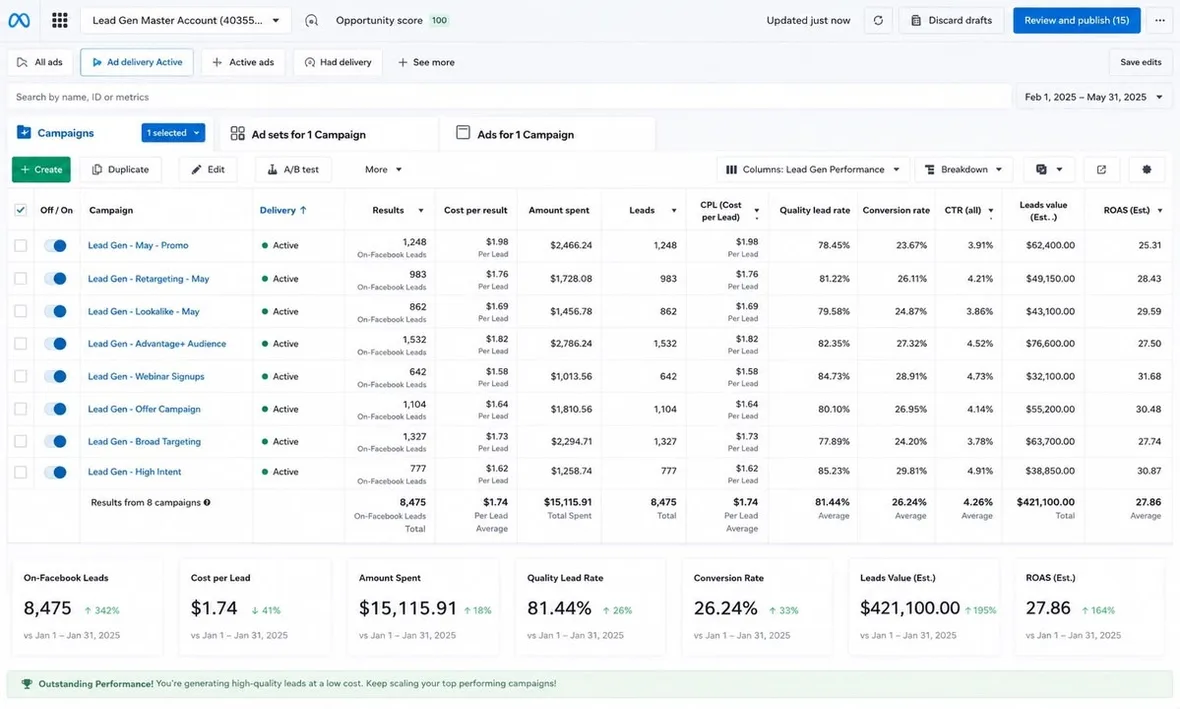
Give each test enough budget and time to exit the learning phase before you judge it — killing an ad set after a day tells you nothing. Judge campaigns on cost per purchase and ROAS, not clicks or likes. This is a real client lead-gen account we manage — the figures on screen are the ones that matter: cost per result, conversion rate, and return.
One more rule: send clicks to a fast, relevant landing page — usually the exact product, not the homepage. A slow page wastes the click you paid for. See how to improve your ROAS for the full list.
Want your Meta Ads set up and managed properly — tracking first, creative tested weekly, budget moved to what sells?
See Meta & Google Ads