Shopify Google Shopping Feed Optimization: Ranking in Free & Paid Listings
How to optimize your Shopify product catalog for Google Merchant Center and Performance Max campaigns — product titles, GTINs, taxonomy, and custom labels.
- Written by
 Fahad, Founder — Head of Development
- Published
- Reading time
- 2 min
- Audit Standard
- Real CrUX Data
On this page · 2 sections
Google Shopping and Performance Max (PMax) campaigns are the backbone of high-intent search acquisition for Shopify brands. When shoppers search Google for a product, they are ready to buy. But Google's algorithm does not read your fancy landing page design; it ranks your products entirely based on the raw quality of your product feed data.
Most Shopify stores simply sync default product titles and descriptions to Google Merchant Center (GMC). By taking 30 minutes to optimize your feed attributes, you can double your impressions and slash your Cost Per Click (CPC) across both free and paid Shopping placements.
The High-Ranking Google Shopping Title Formula
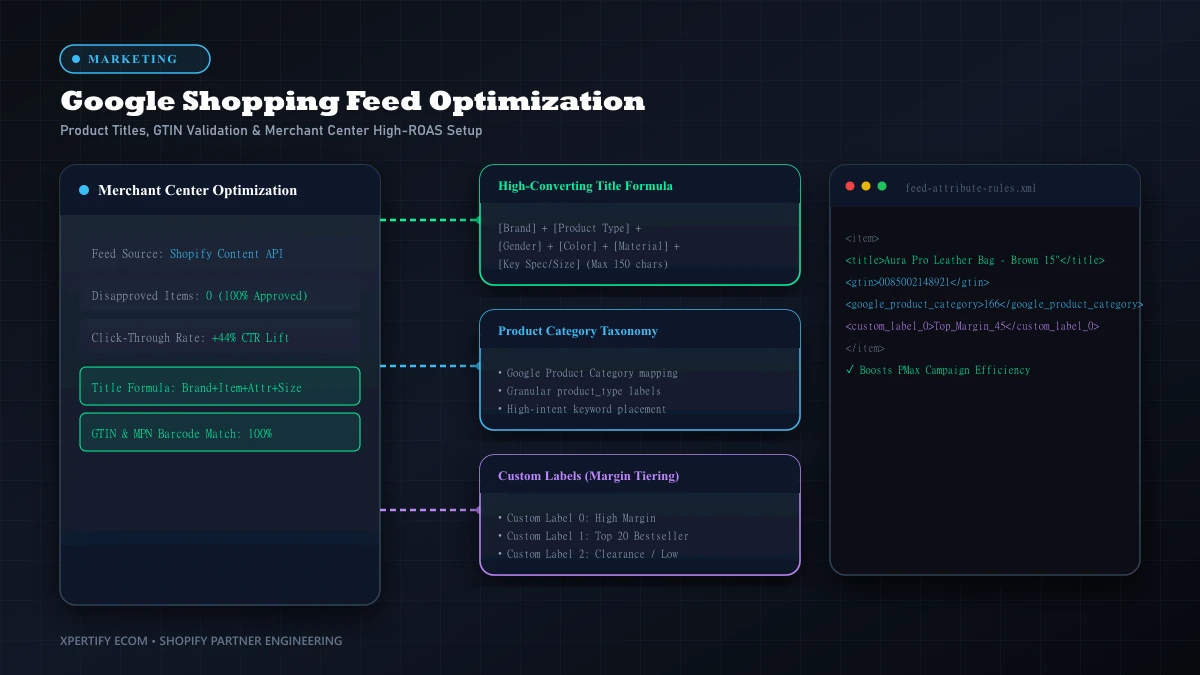
The product `title` attribute is the single most heavily weighted factor in Google's bidding algorithm. Never use vague creative names (e.g., 'The Aurora Dress'). Structure your titles using high-intent search components:
| Product Category | Optimal Title Formula | Example Before & After |
|---|---|---|
| Apparel | Brand + Gender + Product Type + Color + Size + Material | 'Aura' → 'Nordic Wear Men\'s Wool Overcoat - Charcoal Grey - Large' |
| Electronics | Brand + Model + Key Feature + Color + Spec | 'Pulse V2' → 'SoundMax Pulse V2 Wireless Bluetooth Earbuds - ANC - Black' |
| Home & Furniture | Brand + Item + Material + Dimensions + Style | 'Haven Table' → 'Studio Oak Dining Table - 72 Inch Solid Wood - Walnut Finish' |
4 Feed Attributes That Give You an Unfair Advantage
- 01Valid GTIN / Barcode (UPC/EAN): Providing verified GTINs in Shopify inventory settings gives your listing preferential ranking over competitors lacking barcodes.
- 02Specific Google Product Category (GPC): Do not let Google guess. Map each collection to the exact deepest numeric taxonomy tier (e.g., `Apparel & Accessories > Clothing > Outerwear > Coats & Jackets`).
- 03High-Resolution White Background Hero Images: Google Shopping algorithms strongly favor crisp, clean product photography on pure white or neutral studio backgrounds for primary thumbnails.
- 04Custom Labels for Margin & Velocity Segmenting: Use Custom Labels 0–4 (`High Margin`, `Top 10 Seller`, `Seasonal Clearance`) to build smarter, more profitable Performance Max asset groups.
Want to unlock higher ROAS on Google Shopping and Performance Max? Our ecommerce marketing team optimizes your feed and scales your campaigns profitably.
Scale Your Google Shopping Ads